Showing posts with label networking basics. Show all posts

Sunday, June 7, 2015

Different Modes in a router & Booting Sequence

Different Types of Modes in a router:
  1. User Mode à Router>
  2. Privilege Mode à Router#
  3. Global configuration Mode à Router(Config)#
  4. Interface Global configuration Mode/ Interface Mode à Router(config-if)#
  5. Line Mode à #Line Vty

   Line Modes:
   à Auxiliary mode
   à Console mode Vty - Used for Telnet & SSH

Saturday, May 30, 2015

DHCP and 3 Way-handshake

DHCP: Dynamic Host Configuration Protocol
·         It will assign IP address dynamically to the clients
·         It will works on DORA process
·         Port numbers are 67 – for client, 68 – for server
·         DORA – Discover Offer Request Acknowledgment

Default Gateway and APIPA

Default Gateway:
All the PC’s connected with in the Network is communicated with other network devices by using this Default-Gateway only

IP addressing

Comparision between IP address and MAC address

IP (Internet Protocol)/ 
logical address
MAC (Media access control) address/ 
Physical address
It is a 32 bit address                        [8.8.8.8]
It is a 48 bit address            [8:8:8:8:8:8]
It is represented in doted decimal representation
It is represented in hexadecimal representation
It is used to uniquely identify a device within different network
It is used to uniquely identify a device within the same network

Note: first 24 bits represents manufacturer
          Last 24 bits represents device

List of Protocols and there Port numbers

Protocol
Port number
Protocol Used
FTP
File Transfer Protocol
20 - for data
21 - for connection establishing
TCP/UDP
TCP
SFTP
Secure File Transfer Protocol
22
TCP
SSH
Secure Shell Protocol
22
TCP
Telnet
23
TCP
SMTP
Simple Mail Transfer Protocol
25
TCP

TCP/IP Utilities

TCP/IP Utilities

it is used to troubleshoot and to maintain a Network without any Problems

  • PING (Packet Internet Gopher)

  Ping is used to find the connected device is alive are not. Ping uses a special protocol called ICMP (Internet Control Message Protocol)
  We can check it for Connected devices, websites, DNS, DHCP and Print server etc

  • Tracert

It is similar to Ping, it identifies the path through which the packets is going to reach the Destination.

Monday, May 18, 2015

OSI Model:

OSI Model:
Open System Interconnection is a reference model to describe how data communication takes place between one computer to other computer in a network.
it was proposed by International Organization for Standardization (ISO)

  •  OSI is evolved from experiences with ARPANET


Format                       Layer                                             Brief Function
--------------------------------------------------------------------------------------------------------------------------
Data                 -- Application Layer               -- DHCP, FTP, HTTP
Data                 -- Presentation Layer            -- File type ex: JPEG, TXT; Compression
Data                 -- Session Layer                   -- Security, connection establishment,                                                                                           connection release, type of communication
Segment            -- Transport Layer              -- Error control, messages to segments,                                                                                       TCP/UDP
Packet              -- Network Layer                 -- Logical Address & Translation logical to                                                                                    Physical address
Frame              -- Data link Layer                 -- Raw data to logical structure called Frame, A  

Sunday, May 17, 2015

Cable types

 Types of connecting cables:

1. Straight cable
2. Cross cable
3. Roll over cable


Note:
  • For similar devices we will use Cross Cables.
  • For different Devices we will use Straight Cables.
  • For configuration through console port we will use Roll over Cable.


Types of Media used in Networking

Physical Media:

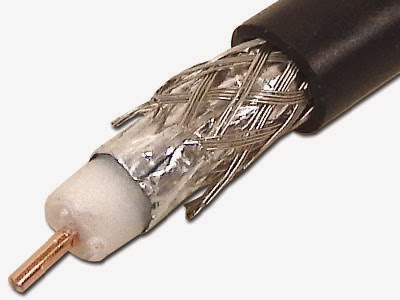
1.      Coaxial cables:

Ethernet based LANs using thick cable for inter-connection is referred as Thicknet. While ethernet systems using thinner coaxial cable is referred as Thinnet.
Thicknet is also referred as 10Base5 systems, where 10 means 10Mbps speed. Base means baseband and 5 denotes 500 meter max. distance between nodes/repeaters. RG-8/U cable is used as thick cable in thicknet based LAN network.
Thinnet is also referred as 10Base2, where 2 denotes 200 m max.distance between two nodes/repeaters. RG-58/U is used as thin cable in thinnet based LAN network.


Saturday, May 16, 2015

Different types of Topologys

Physical topology's :


  1. BUS  Topology
  2. STAR  Topology
  3. TREE Topology
  4. RING  Topology
  5. MESH Topology

Bus topology:

  In bus topology all computers attached to a single continues cable that is terminated at both ends 


  • A “ T ” connector is inserted in the main cable whenever a station need to connect 
  • To avoid the loops and to generating signals we will use terminators at both ends of the cable


Types & Ways of Communications

Types of communications :

1: Simplex communication:  It is a only one way communication.

 Ex: television, radio

Types of network

Types of network:

  1. PAN - personal area network
  2. CAN - campus area network
  3. LAN - local area network
  4. MAN - metropolitan area network
  5. WAN - wide area network

PAN:

A personal area network is a computer area network used for data transmission among devices such as computers, modems, and printer.

LAN:

A local area network is a computer network that interconnects computers within a limited area such as home, school or organisation within a moderate sized geographical area. The speed of LAN is very fast.

Basics of Networking

What is Network:

It is a group of connected devices to share data, information and to communicate with each other.

What is Networking:

            The process of configuring networking devices to make a network for communication is called networking.

Networking devices are 
  • Hub
  • Bridge
  • Switch and
  • Router...etc